Your Business Needs AI. Here Is What It Can Actually Do.

Artificial intelligence is no longer limited to answering questions, writing social media posts or adding a chatbot to a website.
The real opportunity is much larger.
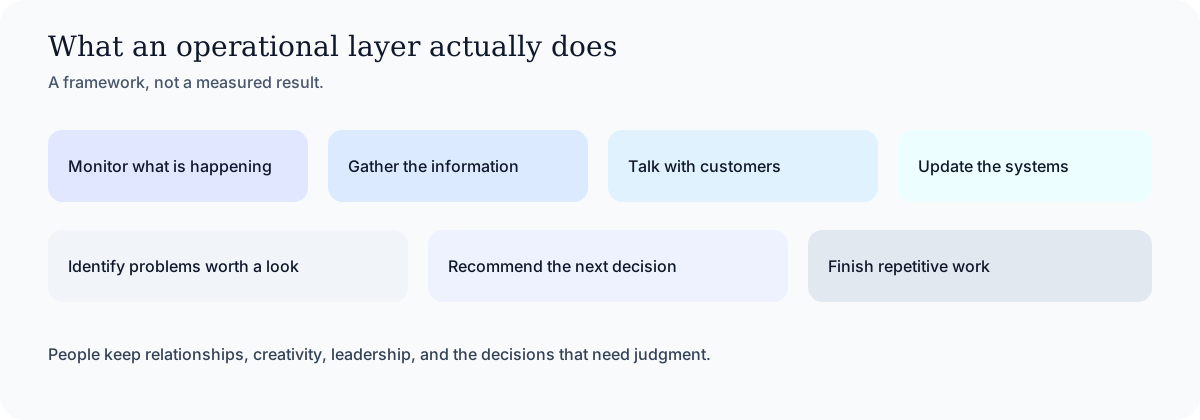
AI can become an operational layer inside a company. It can monitor what is happening, gather information, communicate with customers, update business systems, identify problems, recommend decisions and complete repetitive work around the clock.
The objective is not to automate everything indiscriminately or remove people from decisions that require judgment.
The objective is to let AI handle the work that should happen consistently, quickly and accurately while employees focus on relationships, creativity, leadership and complex decisions.
At Expert AI Labs, we think about AI automation in terms of business outcomes:
- More leads contacted
- More appointments booked
- More estimates closed
- Faster customer response
- Fewer administrative mistakes
- Less repetitive work
- Better customer retention
- Greater visibility for leadership
- More productive employees
- More scalable operations
The ten systems in an automation guide are some of the most immediately valuable opportunities. They include AI voice receptionists, missed-call recovery, intelligent follow-up, appointment reminders, customer reactivation, review management, CRM automation and custom dashboards.
But those opportunities are only the beginning.
Here are many of the other ways intelligent automation can change how a company operates.
1. AI Lead Capture and Immediate Response
Most businesses spend substantial time and money generating leads.
They invest in advertising, websites, search optimization, referrals, social media and salespeople. But when a potential customer finally makes contact, the response process is often inconsistent.
A lead may submit a form and wait until the next morning.
A phone call may go unanswered.
A Facebook message may never reach the sales team.
An email may sit in the wrong inbox.
An AI lead-capture system can monitor calls, forms, email, text messages, chat and social channels from one coordinated workflow.
It can:
- Respond immediately
- Identify what the person needs
- Ask appropriate qualification questions
- Collect contact and project information
- Determine urgency
- Route the opportunity to the right person
- Schedule the next step
- Update the CRM
- Continue following up
- Escalate valuable or urgent opportunities
The result is not simply faster communication. It is a more dependable path from initial interest to a real sales conversation.
2. Intelligent Sales Qualification
Sales teams often spend too much time chasing people who are not ready, qualified or appropriate for the company's services.
AI can help analyze an inquiry before a salesperson invests significant time.
Depending on the business, the system might consider:
- Location
- Service needed
- Company size
- Budget range
- Purchase timeline
- Existing software
- Decision-making authority
- Project complexity
- Prior interactions
- Urgency
- Potential customer value
The AI can then summarize the opportunity, assign an appropriate priority and recommend the next action.
This does not mean allowing AI to reject valuable customers without oversight. It means giving the sales team better information and helping them focus first on the opportunities most likely to move forward.
3. Estimate, Quote and Proposal Follow-Up
Many companies are good at generating estimates but inconsistent about following them through to a decision.
A contractor visits the property, prepares an estimate and sends it.
A service provider delivers a proposal.
A manufacturer provides a quote.
Then everyone gets busy.
The customer may have questions, may be comparing providers or may simply forget to respond.
An intelligent follow-up system can track every outstanding estimate and adjust communication according to:
- The type of service
- Estimated value
- Time since delivery
- Previous customer activity
- Questions or objections
- Whether the proposal was opened
- Changes in the customer's timeline
- The salesperson responsible
Instead of sending the same generic reminder to everyone, AI can prepare relevant, respectful follow-up based on the actual situation.
It can also identify when a human should call personally, when an estimate needs revision or when the opportunity should be closed.
4. AI Voice Reception and Call Intelligence
AI voice systems can do much more than recite business hours.
A properly designed AI receptionist can:
- Answer calls after hours
- Handle common questions
- Determine why the person is calling
- Collect essential information
- Identify emergencies
- Schedule appointments
- Transfer appropriate calls
- Create CRM records
- Send confirmations
- Alert employees about urgent situations

The opportunity continues after the call ends.
AI call intelligence can transcribe conversations, summarize what happened, identify commitments, extract next steps and update the appropriate business systems.
Managers can also use call intelligence to identify:
- Common customer objections
- Missed sales opportunities
- Repeated complaints
- Training needs
- Competitive mentions
- Promises requiring follow-up
- Changes in customer sentiment
This turns phone conversations into structured operational data instead of allowing valuable information to disappear when the call ends.
5. Scheduling, Dispatch and Capacity Management
Scheduling becomes complicated when a company must balance employee availability, geography, skills, equipment, job duration and customer urgency.
AI can help coordinate these variables.

For a field-service company, an intelligent dispatch system could consider:
- Technician location
- Required certification
- Estimated travel time
- Parts availability
- Job priority
- Existing customer commitments
- Weather conditions
- Expected job duration
For an appointment-based practice, it could help fill cancellations, maintain a waitlist, reduce unused capacity and match customers with the appropriate provider.
AI can also notify customers about arrival times, delays, preparation requirements and schedule changes.
6. Customer Onboarding
Closing a sale is only the beginning of the customer relationship.
Onboarding often requires contracts, forms, documents, system access, kickoff meetings, payment information, internal assignments and customer education.
When these steps are handled manually, customers may receive an inconsistent experience and projects can stall before the real work begins.
An AI-assisted onboarding system can:
- Send the correct welcome materials
- Collect required information
- Track missing documents
- Create projects and tasks
- Assign internal owners
- Schedule kickoff meetings
- Provision approved system access
- Answer common onboarding questions
- Alert the team when something is missing
- Provide the customer with status updates
The system can make every customer feel carefully supported without requiring employees to rebuild the process from scratch each time.
7. Customer Service and Support Triage
AI can provide meaningful support without trapping customers inside an unhelpful chatbot.
A strong support system can:
- Understand the customer's question
- Search approved company knowledge
- Provide a grounded answer
- Create a support ticket
- Determine urgency
- Route the issue to the correct team
- Detect frustration
- Collect screenshots or documents
- Summarize the history for an employee
- Track the issue through resolution
AI should know when it is uncertain and when a person needs to become involved.
The objective is not to prevent customers from reaching a human. It is to resolve simple issues quickly and give employees the context needed to handle difficult cases well.
8. Complaint Detection and Customer Recovery
Companies frequently learn about customer dissatisfaction too late.
Warning signs may be spread across support tickets, call transcripts, emails, survey responses, reviews and account activity.
AI can monitor these signals and identify customers who may be at risk.
It can:
- Detect negative sentiment
- Identify repeated unresolved issues
- Pause inappropriate marketing
- Escalate serious complaints
- Prepare a factual case summary
- Recommend a recovery action
- Create a follow-up task
- Track whether the customer was contacted
- Measure whether the problem was resolved
Customer recovery is often more valuable than acquiring another customer to replace the one who left.
9. Customer Retention and Reactivation
Most businesses have valuable customer information sitting unused inside a CRM, scheduling platform or accounting system.
AI can identify customers who:
- Are due for recurring service
- Have not returned within the expected period
- Abandoned a purchase
- Declined a recommended service
- Have an upcoming renewal
- Previously purchased a complementary product
- Have become less active
- May benefit from a seasonal service
The system can then create an appropriate message or task based on the customer's actual history.
This is particularly valuable for dental practices, med spas, automotive businesses, home-service companies, membership businesses and professional-service firms.
10. Review and Referral Generation
Reviews and referrals should not depend entirely on employees remembering to ask.
An automated system can identify successful customer outcomes and select the right moment to request feedback.
It can:
- Ask satisfied customers for a review
- Route unhappy customers into a recovery process
- Send the correct review link
- Follow up respectfully
- Request referrals after positive outcomes
- Attribute referred leads to the original customer
- Thank referral partners
- Report which locations or employees generate the strongest customer satisfaction
This creates a repeatable reputation and referral engine instead of an occasional campaign.
11. Document Intake and Data Extraction
Many companies still employ people to move information from documents into software.
Examples include:
- Invoices
- Purchase orders
- Applications
- Contracts
- Insurance documents
- Inspection reports
- Customer forms
- Receipts
- Resumes
- Service records
- Product specifications
- Emails and attachments
AI can read these materials, extract structured information, detect missing fields, compare values and route exceptions for review.
This can reduce administrative work while improving consistency.
Sensitive or consequential decisions should remain subject to appropriate human controls.
12. Accounts Receivable and Payment Follow-Up
Late payments create cash-flow problems, but payment follow-up is repetitive and uncomfortable for many teams.
An intelligent accounts-receivable workflow can:
- Monitor outstanding invoices
- Match payments to invoices
- Identify overdue accounts
- Send appropriate reminders
- Recognize disputed invoices
- Escalate high-value balances
- Track promises to pay
- Notify account managers
- Produce cash-collection forecasts
AI can assist with communication and organization without receiving unrestricted authority to move money or make sensitive financial decisions.
13. Accounts Payable Preparation
On the other side of the ledger, AI can assist with incoming vendor invoices.
It can:
- Extract invoice data
- Detect possible duplicates
- Compare invoices with purchase records
- Flag unexpected price changes
- Identify missing approvals
- Prepare accounting classifications
- Route the invoice to an authorized human
- Maintain an audit trail
The AI prepares and verifies the work. An authorized person remains responsible for approving payments.
14. Contract and Compliance Monitoring
Important obligations are often buried inside contracts and policy documents.
AI can help identify:
- Renewal dates
- Notice requirements
- Payment terms
- Required deliverables
- Insurance obligations
- Service-level commitments
- Termination provisions
- Missing signatures
- Inconsistent language
- Upcoming compliance deadlines
The system can create reminders, assign responsibility and surface potential issues before deadlines are missed.
Legal interpretation and final approval should remain with qualified people.
15. Employee Onboarding and Internal Operations
New employees frequently wait for equipment, credentials, training and basic information.
An AI-assisted onboarding system can coordinate:
- Employee forms
- Policy acknowledgements
- System access requests
- Equipment assignments
- Training schedules
- Team introductions
- Role-specific resources
- 30-, 60- and 90-day milestones
- Manager check-ins
- Outstanding requirements
Similar workflows can support departures, internal transfers, recurring certifications and policy updates.
16. Internal Knowledge Agents
Employees lose time searching through shared drives, inboxes, training materials and old conversations.
An internal AI knowledge agent can answer questions using approved company information and show where each answer came from.
Employees might ask:
- What is our policy for this situation?
- How do I complete this process?
- Which product fits this customer?
- Where is the latest pricing document?
- What did we promise this client?
- Who is responsible for this account?
- How was this issue handled previously?
Access should reflect the employee's permissions. Confidential information should not become available simply because an AI system can search for it.
17. Meeting-to-Execution Automation
Companies spend enormous amounts of time in meetings, but decisions and action items are often lost afterward.
An AI meeting system can:
- Create a transcript
- Summarize the discussion
- Identify decisions
- Extract action items
- Assign owners
- Record deadlines
- Update the CRM
- Create project tasks
- Draft follow-up messages
- Track whether commitments were completed
The result is not merely better meeting notes. It is a direct connection between conversation and execution.
18. Executive Intelligence and Daily Briefings
Business owners frequently have data across accounting software, CRM systems, support platforms, project-management tools, advertising accounts and spreadsheets.
An executive intelligence system can turn that fragmented information into one useful briefing.

It might report:
- New leads
- Sales activity
- Outstanding proposals
- Cash collected
- Overdue invoices
- Customer complaints
- Operational delays
- Employee capacity
- Marketing performance
- Unusual activity
- Decisions requiring approval
Instead of opening ten platforms, leadership receives the information that actually requires attention.
19. Inventory, Orders and Supply Coordination
Product companies can use AI to identify operational exceptions such as:
- Low inventory
- Delayed purchase orders
- Incomplete specifications
- Pricing mismatches
- Threatened delivery dates
- Unexpected demand
- Duplicate orders
- Missing shipping information
- Production delays
- Customer orders requiring attention
AI can connect order systems, inventory platforms, operational spreadsheets and customer communication so employees are not manually transferring information between them.
20. Recruiting and Applicant Coordination
Recruiting includes a large amount of repetitive coordination.
AI can help:
- Organize applications
- Compare candidates with explicit requirements
- Summarize relevant experience
- Schedule interviews
- Collect necessary information
- Maintain candidate communication
- Prepare interview questions
- Record interview feedback
- Track hiring stages
Final hiring decisions should remain human, particularly when judgment, fairness and legal compliance are involved.
21. Industry-Specific AI Systems
The greatest value often comes from combining general AI capabilities with a company's specific operating model.
Home services
AI can manage missed calls, emergency triage, estimate follow-up, technician scheduling, maintenance reminders and customer reactivation.
Dental and medical practices
AI can support appointment scheduling, no-show reduction, patient recall, treatment-plan follow-up, document intake and common administrative questions.
Law firms
AI can assist with intake, consultation scheduling, document organization, matter summaries, deadline monitoring and lead follow-up while keeping legal advice with attorneys.
Property management
AI can classify maintenance requests, collect supporting information, identify emergencies, coordinate vendors and keep tenants and property owners informed.
Automotive services
AI can manage appointments, service reminders, estimate follow-up, repair-status communication, declined-service reactivation and review requests.
Manufacturing and distribution
AI can connect orders, inventory, production schedules, purchase orders, dealer communication, delivery updates and exception reporting.
Professional services
AI can support lead qualification, proposal preparation, client onboarding, meeting follow-up, project reporting, renewals and accounts receivable.
What Should Not Be Fully Automated?
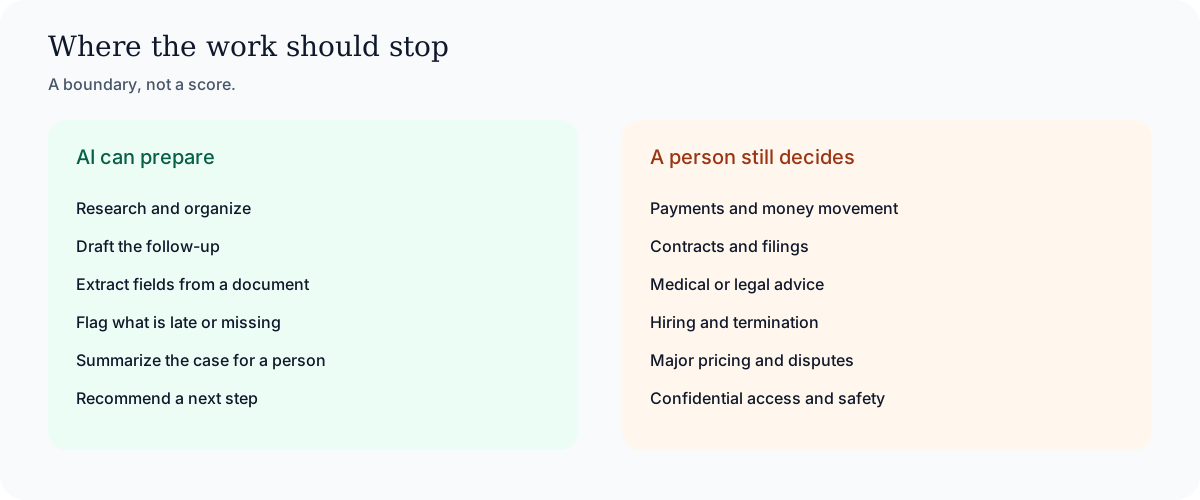
Responsible AI implementation includes knowing where automation should stop.
Businesses should be cautious about giving unsupervised systems authority over:
- Payments and money movement
- Legally binding agreements
- Medical or legal advice
- Hiring and termination decisions
- Sensitive employee actions
- Major pricing changes
- Regulatory filings
- High-impact customer disputes
- Access to confidential information
- Decisions with significant safety implications
AI can research, organize, analyze, prepare and recommend. The appropriate human should retain authority over consequential decisions.
How to Determine Where Your Business Should Begin
The best first automation is not necessarily the most technologically impressive one.
It is usually the workflow with the clearest combination of:
- High frequency
- Significant manual effort
- Predictable steps
- Expensive delays
- Measurable outcomes
- Accessible data
- Limited implementation risk
Ask these questions:
- Where are leads or customers falling through the cracks?
- What work does the team repeat every day?
- Where are employees copying information between systems?
- What happens too slowly?
- What depends on someone remembering?
- Which questions are answered repeatedly?
- Where do mistakes create the greatest cost?
- What prevents the company from serving more customers?
- Which reports take hours to assemble?
- What work would the team gladly stop doing manually?
The answers usually reveal the highest-value starting point.
AI Should Become Part of How the Company Operates
Businesses do need AI.
But they need more than access to a model or another software subscription.
They need AI connected to their real workflows, trusted information, communication channels and business systems.
They need AI that can perform useful work, provide evidence, respect permissions, recognize uncertainty and involve a human when judgment matters.
That is the future we are building at Expert AI Labs.
We help businesses identify their most valuable AI opportunities, design the right workflows and integrate intelligent automation into the systems they already use.
If your company knows it needs AI but is unsure where to begin, send me a message.
Tell me what your business does and which process creates the most frustration, wasted time or lost revenue.
I will tell you the first three AI systems I would consider building.
Tell us the process that creates the most friction
What the business does, and which step wastes time or loses the customer. That is enough to name a starting point.
Start with a conversation